

The 2025 Tax Questionnaire is Ready
Rooney Schmidt SmartVault Emails Have Been Sent!
Our 2025 tax questionnaire has been sent to our clients through SmartVault via email. Please check your email for a message from "notify@my.smartvault.com" with the subject line: 'Required Form for 2025 Tax Engagement.' Below is an example of what the email looks like for reference:
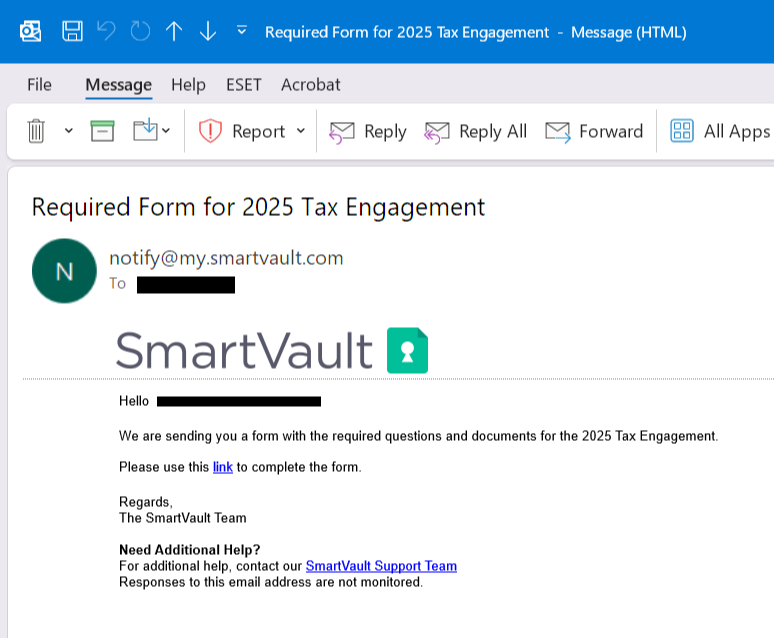
This email includes a secure link to start your personalized tax questionnaire and document requests—a streamlined way to share your tax information and documents with us in one secure location.
What to do next:
Complete your tax questionnaire and upload documents. Need more time? Save your progress and return anytime. Be sure to only click on "Submit" when you have uploaded all your documents.
Have paper copies of your documents? Simply log into SmartVault and use your smart device to snap photos, no scanner needed! SmartVault automatically converts them into PDFs. Be sure to allow SmartVault to access your camera on your device.
Important: Upload your documents through the SmartRequestAI link provided in your email. If you choose to log in directly to your SmartVault account, click the Document Requests Pending – View and Respond to Requests tile instead of the Secure Document Upload tile, to ensure proper submission.
Didn’t receive your personalized email? Please check your spam or junk folder. If you still cannot locate it, contact us to confirm your account. New to the portal? Let us know and we will arrange access for you.
See SmartRequestAI in action: [Watch Demo]